For companies and self-employed people who cannot keep up with answering the phone
When you cannot get to the phone, the assistant answers it.
It writes down what the customer needs and agrees a visit within your hours. You see everything in the app.
Try it for real for 250 CZK. Founding members get the first three months 60% cheaper.

Demo
Listen to the assistant
Call and agree a trial visit with a made-up company. Right at the start, the assistant says that the call is recorded.
Demo number (the assistant speaks Czech)
+420 910 923 513
Say what is wrong, where it is and when a visit suits you.
Call the demo, +420 910 923 513Call recording
What the company received
demoSMS to the company phone
AutomX: hovor od Pan Dvorak (+420 600 000 001), kape kohoutek v koupelne, termin ut 13. 10. mezi 12 a 14. Detail v aplikaci.
E-mail about the call
Automat vzal hovor: Pan Dvořák
- Co potřebuje, slovy volajícího: „kape kohoutek v koupelně“
- Kde: Ukázková 12, Praha 4
- Domluvená návštěva: út 13. 10. mezi 12:00 a 14:00, zapsaná v kalendáři
This is how the messages about Mr Dvořák’s demo call reach the company (in Czech). The company, Mr Dvořák, the address and the appointment are made up.
Read the whole call
Call transcript
demo- AutomatDobrý den, tady asistentka firmy Instalatérství Ukázka. Mluvíte s umělou inteligencí, hovor se nahrává a zpracovává ho ElevenLabs se svými dodavateli. Jak vám můžu pomoci?
- VolajícíDobrý den, kape mi kohoutek v koupelně.
- AutomatAha, kape vám kohoutek v koupelně. Jedná se o dům, nebo byt?
- VolajícíO byt.
- AutomatInstalovali jsme vám to my, nebo někdo jiný?
- VolajícíNěkdo jiný.
- AutomatA víte značku a jestli je to ještě v záruce?
- VolajícíZnačku nevím, v záruce už asi není.
- AutomatDobře. Mám vám zarezervovat termín návštěvy, nebo stačí, když později zavolá kolega?
- VolajícíRadši termín.
- AutomatDobře, podívám se, kdy mají naši technici volno. Mezitím se zeptám: hodilo by se vám to někdy tento týden, nebo máte na mysli konkrétní termín?
- VolajícíDnes, jestli to jde.
- AutomatDnes máme volno mezi dvanáctou a druhou odpoledne, nebo kolem čtvrté odpoledne. Jste s tím takhle v pohodě?
- VolajícíTo první.
- AutomatTakže dnes mezi dvanáctou a druhou odpoledne, jste s tím takhle v pohodě?
- VolajícíAno.
- AutomatJeště potřebuji vědět, kam máme přijet. Stačí město, ulice a číslo popisné.
- VolajícíPraha 4, Ukázková 12.
- AutomatUkázková dvanáct, Praha čtyři, mám to správně?
- VolajícíAno.
- AutomatDěkuji. A vaše jméno, prosím?
- VolajícíPavel Dvořák.
- AutomatPane Dvořáku, děkuji. Moji kolegové vám zavolají zpátky na číslo, ze kterého voláte, souhlasíte?
- VolajícíAno.
- AutomatDobře.
- AutomatHotovo, návštěvu máte zapsanou. Kolega vám ji ještě potvrdí. Můžu vám pomoct ještě s něčím?
- VolajícíNe, děkuji.
- AutomatDěkuji za zavolání, mějte se hezky. Na shledanou.
Transcript from the demo mode of the app, in Czech. The company, Mr Dvořák, the address and the appointment are made up.
What it does
What the assistant does for you
You turn each process on or off in the app. What is off, the assistant does not do.
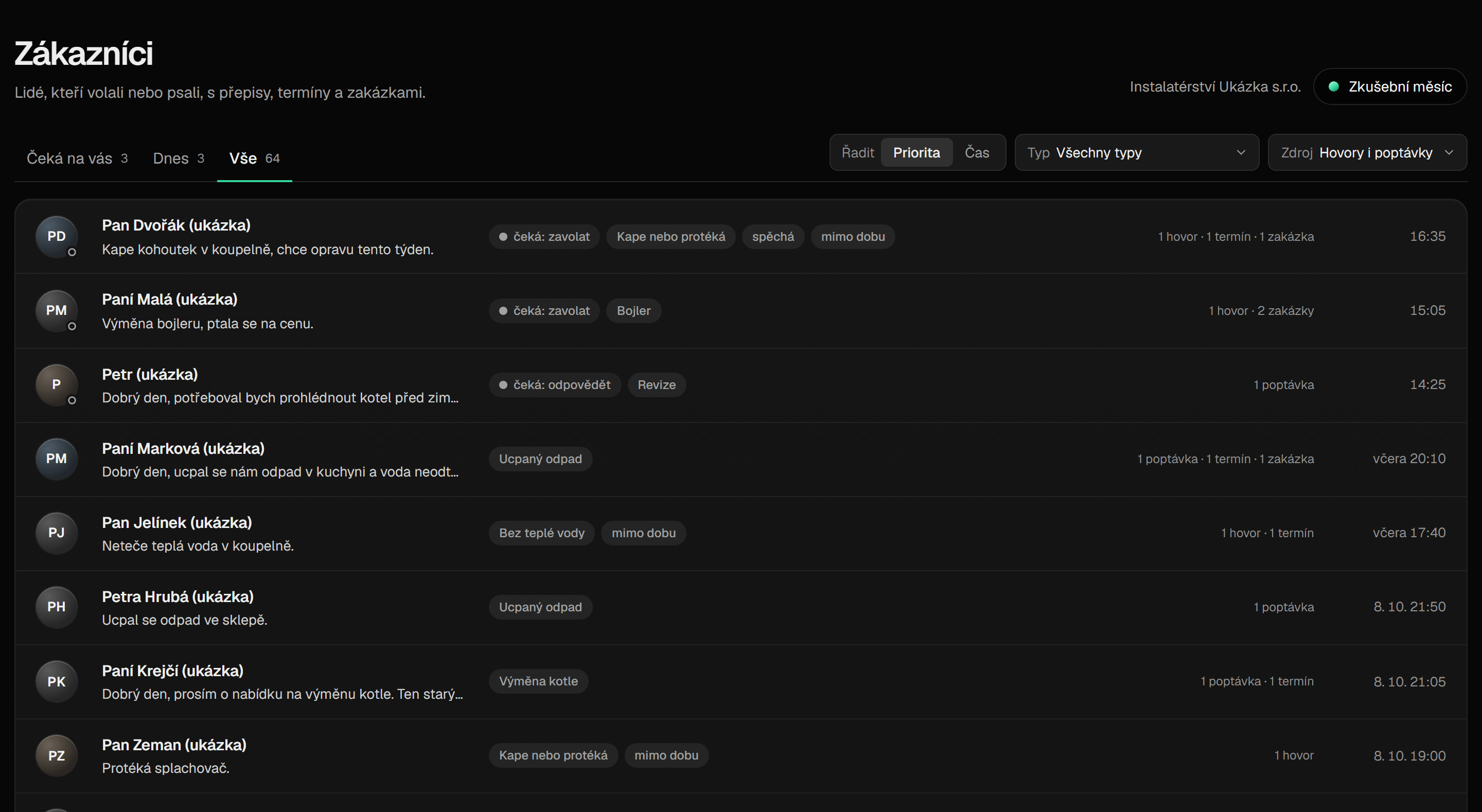
01Calls
It takes a call you do not answer and writes down who is calling, what they need and where it is.
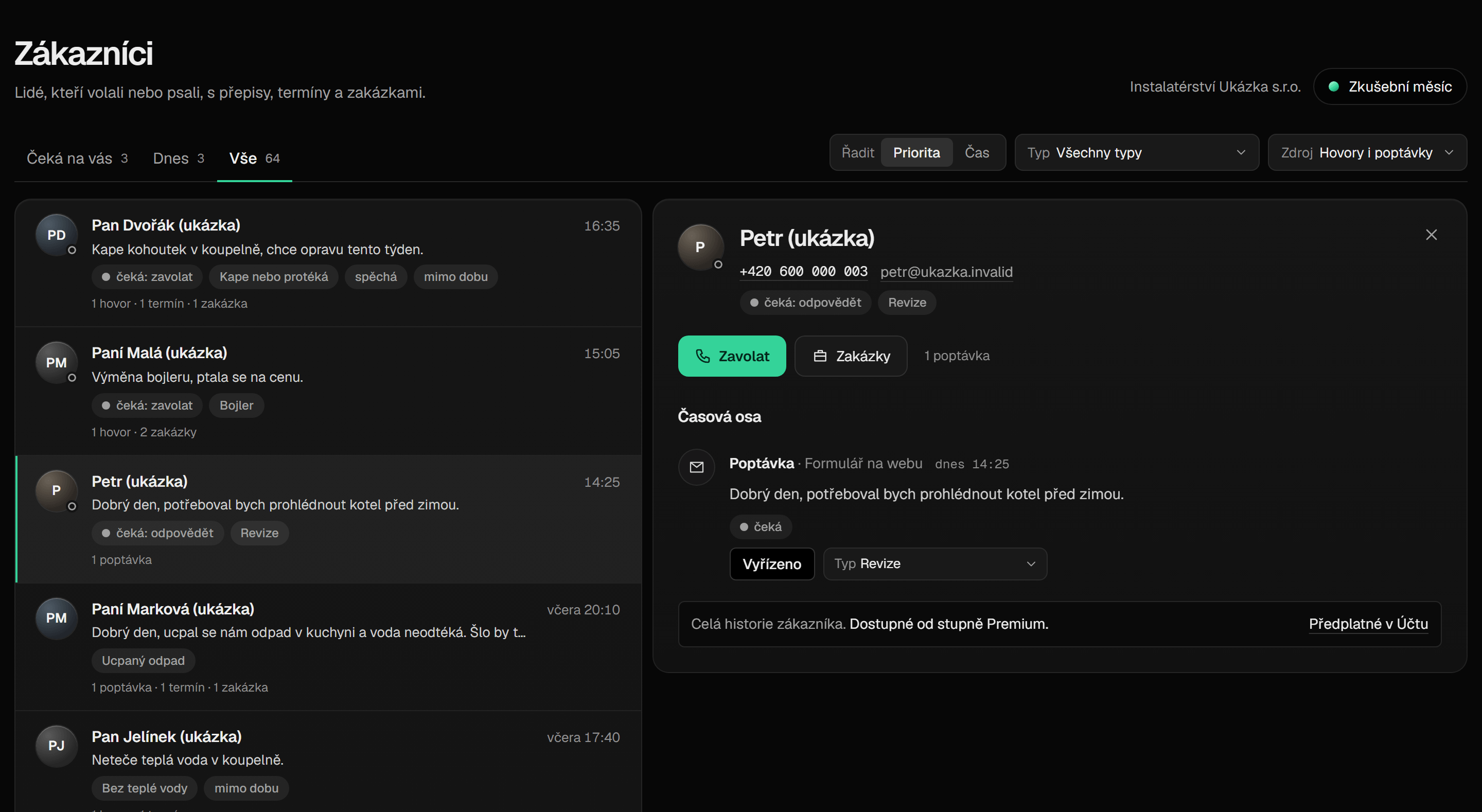
02Inquiries
It records an inquiry from the form on your website and sends the customer a confirmation from your mailbox.
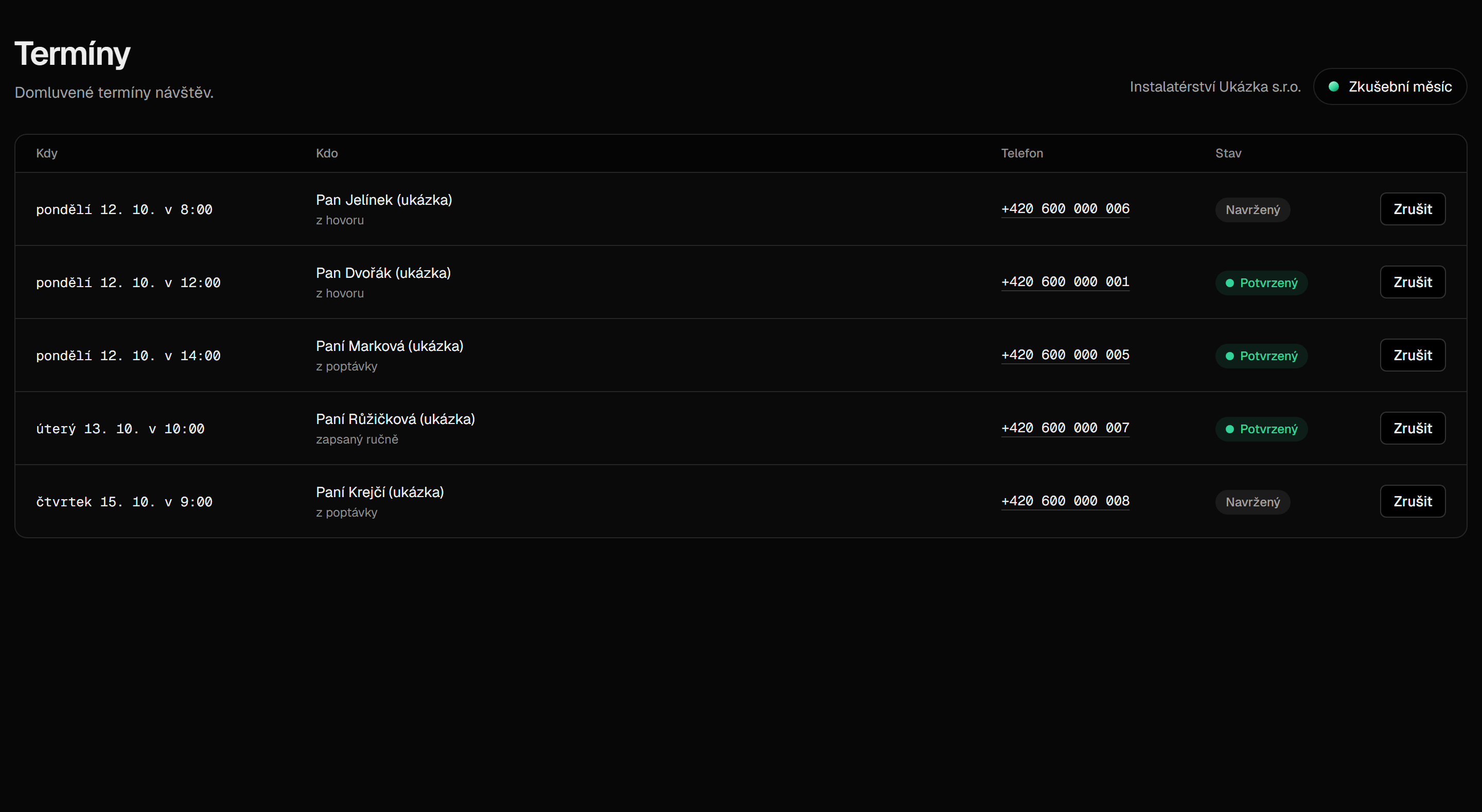
03Appointments
It offers only the times you set aside for visits. For each appointment you get a calendar invitation.
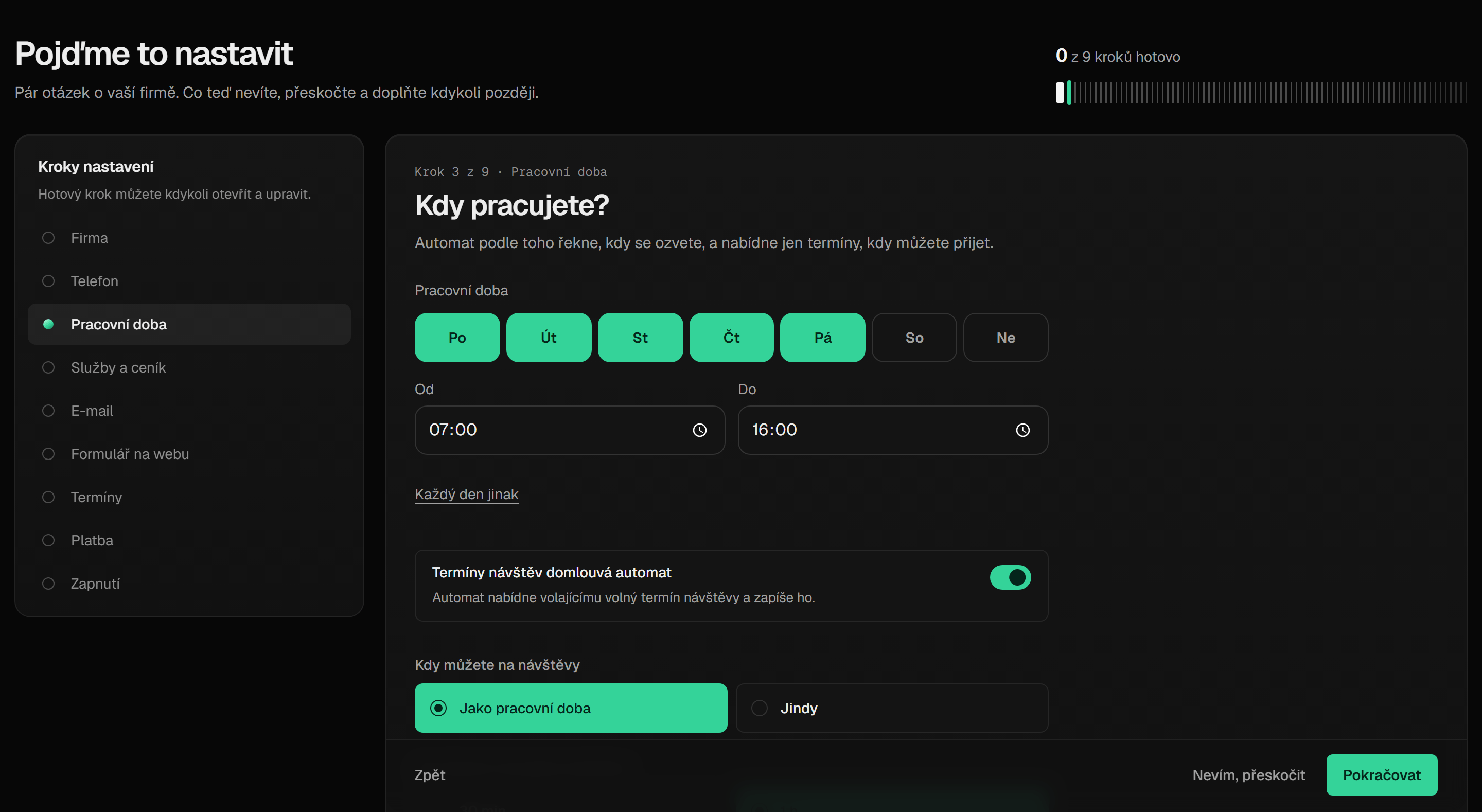
04Setup guide
You enter your business hours, services with a price list and mailbox yourself, step by step in the app.


- RemindersThe day before a visit it sends the customer a reminder by e-mail, so they are at home waiting for you.
- Review requestAfter a finished job it sends the customer one e-mail with a link to rate your company. It asks each customer at most once.
- Contacts and jobsPeople from calls and inquiries are added to contacts and jobs in the app on their own. It never merges two different people into one.
Setup
How you set it up
No installation, no technician at your place. You set everything up yourself from a computer.
Step 1: You sign up and go through the setup guide in the app
We find your company by its Company ID. You enter your business hours when you can make visits, your services with a price list, and your mailbox.
Step 2: You forward your calls using the card
The card shows you the code for the Czech carriers O2, T-Mobile or Vodafone. The calls you do not answer are then taken by the assistant. Your phone rings as it does today.
Step 3: The assistant answers, agrees visits and sends e-mails
It writes down what the customer needs, agrees a visit within your hours and sends the e-mails you turn on. You see everything in the app.
Rules
Only what is true
There are no reviews here yet, we are just starting. Instead of numbers from advertising, we show the rules the app keeps.
- The assistant always introduces itselfAt the start of the call it says that it is the assistant of your company, that the caller is talking to artificial intelligence and that the call is recorded. The caller cannot interrupt this introduction.
- Recordings for 30 daysWe keep a call recording for 30 days, then it is deleted.
- No recording wanted? We delete itIf the caller says they do not want to be recorded, we delete their recording within 2 working days. The transcript stays, so you can get back to them.
- Database in the EUWe store app data in the EU. Voice and transcripts are also processed by suppliers in the USA, so we do not claim that everything stays in the EU.
- Disconnecting deletes accessWhen you disconnect your mailbox, we delete the stored access to it right away.
- Review request only onceIt sends each customer a review request at most once and respects an unsubscribe.
Boundaries
What the assistant cannot do yet
We would rather say it now than after the first call.
- It does not judge urgencyIt does not assess what is urgent and gives no advice. It is not a breakdown, emergency or on-call line.
- It does not make sales callsIt never calls anyone to sell something. It only takes the calls you do not answer.
- No prices outside your price listIt quotes a price only from the price list you enter, and adds that it is approximate. Without a price list it quotes none.
- SMS only to Czech and Slovak mobilesIt sends the customer the appointment confirmation and the reminder by e-mail or SMS. An SMS only reaches a mobile in the Czech Republic or Slovakia, and it cannot be replied to.
- It does not call back web inquiriesIt records the inquiry and confirms it by e-mail. Calling the customer back is up to you.
- No Microsoft 365 yetYou cannot connect an Outlook or Microsoft 365 mailbox or calendar yet.
- Czech-speaking onlyThe assistant speaks Czech, the numbers are Czech and the terms are in Czech. Companies from other EU countries can sign up and pay in euros, but their callers must speak Czech.
Price
Two plans, trial for 250 CZK
Try it for real for 250 CZK, then you pay monthly in advance according to your plan.
1,490CZK
excl. VAT per month
1,802.90 CZK incl. VAT 21%
200 call minutes per month
- The assistant takes the calls you do not answer
- Visit appointments in the AutomX calendar
2,990CZK
excl. VAT per month
3,617.90 CZK incl. VAT 21%
500 call minutes per month
Everything in Základ, plus:
- Inquiries from the form on your website
- Inquiry form for your website
- Review request after a finished job
- Reminders by e-mail
- Full history of every customer
- Up to 3 people in the account
- The account and setup are free and need no card. You try it for real with a trial pack: 30 call minutes for 14 days for 250 CZK excl. VAT, you pay once.
- Companies from other EU countries pay in euros: 59 or 119 EUR excl. VAT per month.
- The subscription is paid by card in advance, the first payment right away. You save your card with Stripe; we do not see its details.
- You can change your plan in the app at any time. Your carrier's fee for a forwarded call is not included in the price.
- 2 places for founding members: the first three monthly payments are 60% lower.
Questions
Frequently asked questions
The answers are based on the Terms of Service. Send any other question to info@automx.io.
Does the caller know they are talking to an AI assistant?
Yes. At the start of every call the assistant says that it is the assistant of your company, that the caller is talking to artificial intelligence, that the call is recorded and that it is processed by ElevenLabs and its suppliers. This introduction cannot be skipped or interrupted.
Do I have to change my number or carrier?
No. Customers keep calling your number and your phone rings as it does today. You forward the calls you do not answer with the code from the card for the Czech carriers O2, T-Mobile or Vodafone.
You can cancel call forwarding yourself at any time, with a code from the same card.
Does the assistant tell the customer a price?
Only from the price list you enter in the setup guide: at most 10 services, and for each one, as needed, faults, solutions, brands and models with their own price. It always adds (in Czech): “This is approximate, a colleague will tell you the exact price after an inspection.” To anything outside the price list it answers that a colleague will tell them the price.
How much does it cost and how do I pay?
The account and setup are free and need no card. You try it for real with a trial pack: 30 call minutes for 14 days for 250 CZK excl. VAT, you pay once. Then, depending on the plan, 1,490 or 2,990 CZK excl. VAT per month (1,802.90 or 3,617.90 CZK incl. VAT). Companies from other EU countries pay 59 or 119 EUR excl. VAT per month.
The subscription is paid by card in advance, the first payment right away. You save your card with Stripe and we do not see its details. Your carrier's fee for a forwarded call is not included in the price.
What if the assistant makes a mistake?
It can happen. The assistant is software: it can mishear, write down a name, number or address wrongly, or fail to agree an appointment. That is why you see a transcript of every call and can check the record in it.
Try the assistant on your own phone.
You can do the setup yourself from a computer.